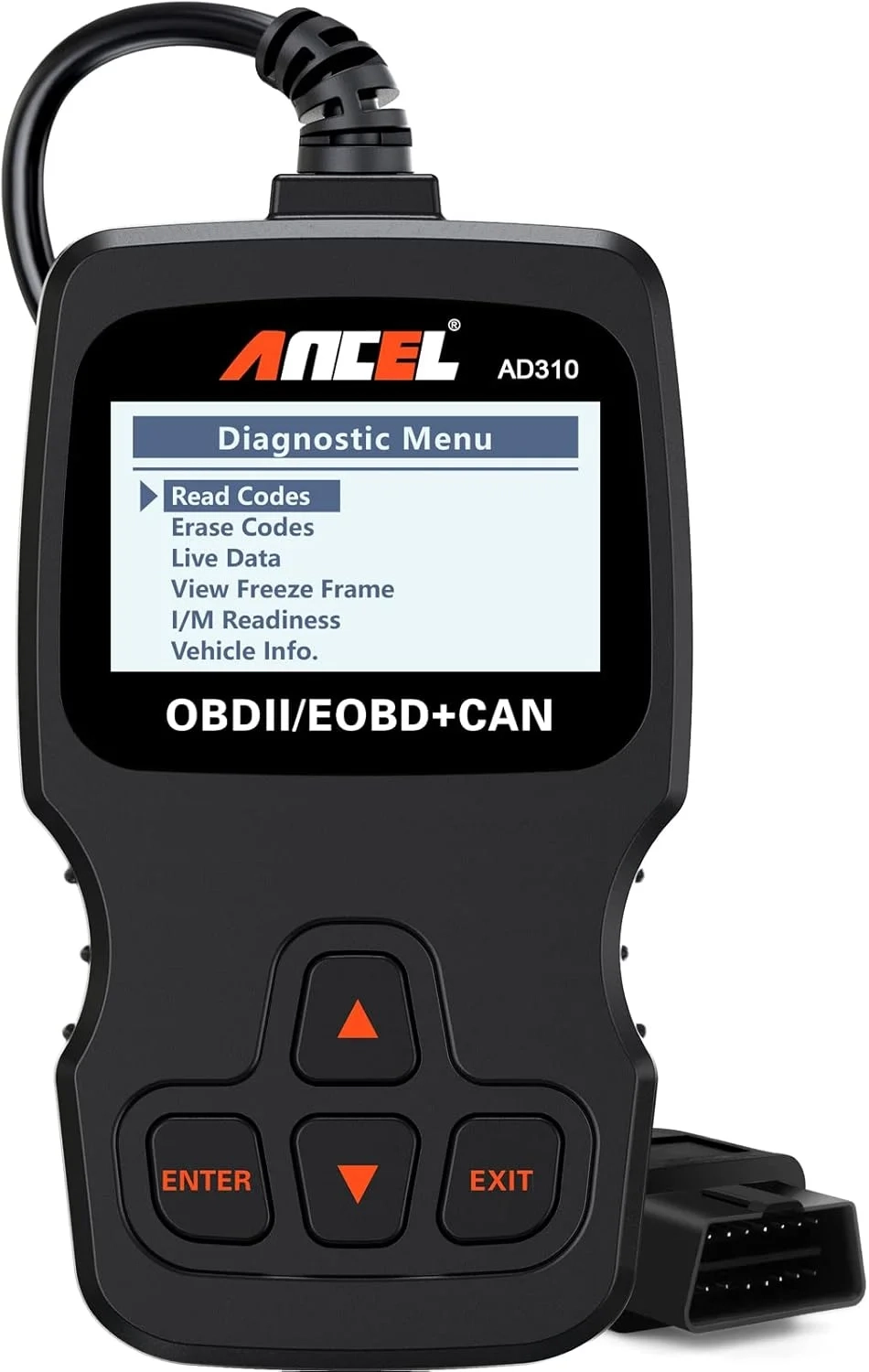
ANCEL AD310 OBD2 Scanner Review: Diagnose Car Engine Fault Codes
Introduction
A check engine light can instantly turn a good day into a stressful one. For many drivers, it’s a confusing signal that could mean anything from a loose gas cap to a serious engine problem. This is where an OBD2 scanner, like the popular ANCEL AD310, becomes an essential tool for modern vehicle owners.
Instead of rushing to a mechanic for every warning light, you can gain immediate insight into your car’s health. The right OBD2 code reader empowers you to diagnose issues quickly, saving both time and money. This article will guide you through using these devices effectively.
OBD2 Scanner Problems and Solutions
Many drivers purchase a basic code reader only to encounter frustrating limitations. A common issue is a scanner that fails to connect or read codes from their specific vehicle model, often due to incompatible protocols. Others find that their cheap tool only provides a generic code without the crucial live data needed for an accurate diagnosis.
Furthermore, users can be confused by the data they receive, unsure if a code indicates an urgent repair or a minor glitch. Without the ability to view freeze frame data or monitor readiness status, it’s hard to know if a problem is truly resolved after a repair. These pitfalls can make the diagnostic process feel more complicated than helpful.
Step-by-Step Solutions
To effectively use an OBD2 scanner like the ANCEL AD310, follow these clear steps. This process demystifies the check engine light and puts you in control.
- Locate Your OBD2 Port: Find the 16-pin diagnostic connector, usually under the dashboard near the steering column. Plug your scanner in securely.
- Turn on the Ignition: Power your vehicle’s electrical system, but you don’t need to start the engine. The scanner will power on from the port.
- Read the Codes: Select “Read Codes” from the menu. Write down all the Diagnostic Trouble Codes (DTCs) that appear.
- Research the Codes: Use the code definitions or an online database to understand what each code means for your specific car make and model.
- View Supporting Data: For a deeper look, use functions like “Live Data” to see real-time sensor readings or “Freeze Frame” to see conditions when the fault occurred.
- Clear Codes (After Repair): Once you’ve addressed the issue, use the “Clear Codes” function to turn off the check engine light and reset the system.
Alternatives and Comparisons
While basic code readers like the ANCEL AD310 are perfect for home use, there are more advanced alternatives. Smartphone-based Bluetooth scanners pair with detailed apps, offering extensive data logging and graphing capabilities, ideal for tech-savvy users.
On the professional end, high-end diagnostic tools from brands like Snap-on offer bidirectional controls, allowing mechanics to activate components for testing. For the average car owner focused on engine and emission codes, a dedicated, reliable unit like the AD310 often provides the best balance of simplicity, durability, and value without the complexity or subscription fees of advanced systems.
Practical Use Cases
An OBD2 scanner is invaluable in several everyday scenarios. Before purchasing a used car, you can quickly scan for hidden problems or recently cleared codes that a seller might not disclose. After performing routine maintenance like changing spark plugs or an oxygen sensor, you can clear the related codes and verify the repair was successful.
If your check engine light comes on during a road trip, a portable scanner can help you determine if it’s safe to continue driving to the next town or if you need immediate assistance. For hobbyists who enjoy DIY car projects in the Technology Blog or Smart Car Gadgets category, it’s a fundamental tool for troubleshooting modifications and understanding vehicle performance.
FAQs
What is an OBD2 scanner?
An OBD2 scanner is a diagnostic tool that plugs into a car’s onboard computer system. It reads standardized trouble codes that trigger the check engine light, helping identify issues with the engine, transmission, and emissions systems.
How does a basic code reader compare to a professional scan tool?
Basic code readers, like the ANCEL AD310, are designed for consumers to read and clear common engine fault codes. Professional scan tools offer deeper system access, advanced diagnostics for all car modules, and bidirectional testing capabilities that mechanics require.
Is an OBD2 scanner worth it for a non-mechanic?
Absolutely. For any vehicle owner, a simple OBD2 code reader is a wise investment. It provides peace of mind, can save hundreds of dollars in diagnostic fees, and helps you communicate more effectively with your mechanic by providing specific codes.
Conclusion
Understanding and addressing your vehicle’s check engine light doesn’t require expert knowledge, just the right tool. A reliable OBD2 scanner demystifies car troubles and puts valuable diagnostic information at your fingertips. By following a clear process, you can transition from feeling anxious about warning lights to feeling confident about your car’s maintenance and health.
About This Topic
An OBD2 scanner is an electronic diagnostic tool that interfaces with your vehicle’s onboard computer. It is used to retrieve diagnostic trouble codes (DTCs), which are standardized signals that explain why the check engine light or other warning indicators have been activated. This topic covers how these code readers work, their core functions, and how to interpret the data they provide.
This information benefits virtually every car owner, from daily commuters to used car buyers and DIY enthusiasts. Beginners will learn how to perform a basic diagnostic scan, while hobbyists can use live data streams for deeper insights into engine performance. It is particularly valuable for owners of vehicles from 1996 and newer, which are equipped with the standardized OBD2 port.
A common misconception is that these tools are only for mechanics or that they can “fix” car problems. In reality, an OBD2 code reader is strictly a diagnostic device—it identifies issues but does not repair them. Another concern is compatibility; not all scanners work with all car models or can access every system, so checking protocol support for your specific vehicle is crucial. Understanding these scanners helps you avoid unnecessary repair costs and make informed decisions about your vehicle’s care.
Product Specifications
- Product Name: ANCEL AD310 OBD2 Scanner
- Manufacturer: ANCEL
- Model Number: AD310 / AD310B
- Primary Function: Engine diagnostics and check engine light reading
Physical Specifications
- Product Dimensions: 8.9″ (L) x 6.9″ (W) x 1.4″ (H) / 226mm (L) x 175mm (W) x 36mm (H)
- Item Weight: 8.4 ounces / 238 grams
Technical & Performance Specifications
- Diagnostic Functions: Reads and clears diagnostic trouble codes (DTCs), turns off check engine light (MIL), displays live engine data
- Compatible Protocols: Supports all OBD2 protocols: CAN, SAE J1850 PWM, SAE J1850 VPW, ISO9141-2, ISO14230-4 (KWP2000)
- Vehicle Compatibility: Works with all OBD2-compliant vehicles sold in the USA from 1996 and later, and European/Asian vehicles from 2000 and later (gasoline and diesel)
- Operating Voltage: 12 Volts DC
- Power Source: Powered directly through the vehicle’s OBD2 DLC connector; no external battery required
- Internal Battery: 1 Lithium-Ion battery for memory backup
- Display: Backlit LCD screen
- Operating System: Embedded Linux
- Interface Language: English
Certifications & Standards
- Compliant with: SAE J1978 OBD2 standards
Package & Identification
- Manufacturer Part Number: AD310
- UPC Codes: 602938440233, 602938439893, 602938430845
- Global Trade Identification Number (GTIN): 00602938440233

