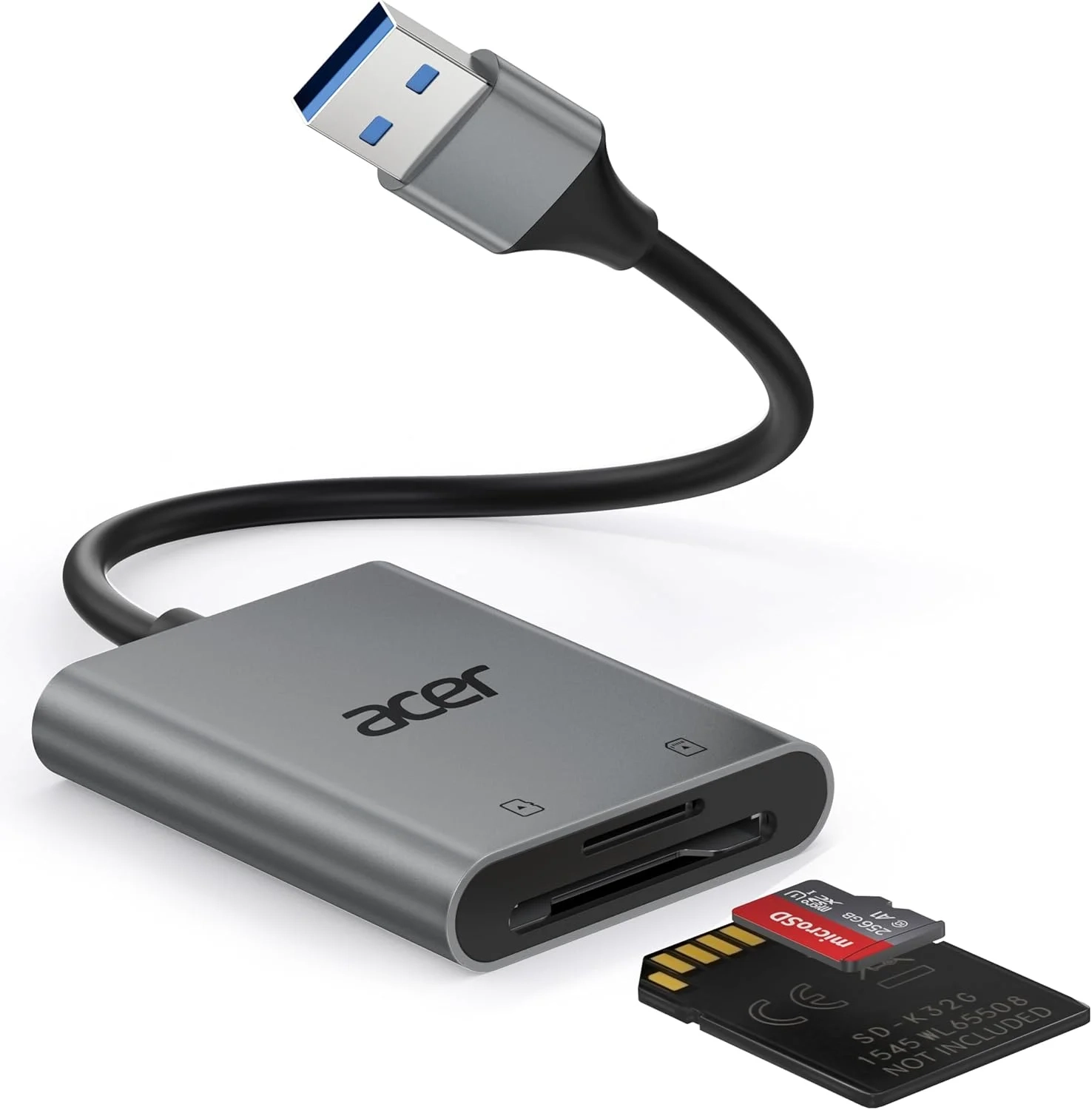
Acer SD Card Reader: USB 3.0 Adapter Guide
Introduction
In today’s digital world, moving photos and videos from your camera to your computer needs to be fast and reliable. A USB SD card reader is the essential bridge that makes this happen. This compact tool is a powerhouse for anyone who works with media, offering a simple plug-and-play solution for high-speed data transfer.
Forgetting your card reader can bring a workflow to a complete halt. This article explores why a quality reader is indispensable, how to choose one, and how to get the most out of it for seamless file management.
USB SD Card Reader Problems and Solutions
Many users face common frustrations with their memory card adapters. A frequent issue is slow transfer speeds, which turns backing up a day’s shoot into a tedious wait. Another problem is physical compatibility; some readers won’t fit cards with thicker cases or block adjacent ports on a laptop.
Compatibility errors are also common. Users might find their device doesn’t recognize the card, or they accidentally purchase a reader that doesn’t work with their computer’s ports. Understanding these pitfalls is the first step to finding a reliable solution for your data transfer needs.
Step-by-Step Solutions
To avoid common issues and ensure optimal performance, follow these steps:
- Check Your Ports: Before buying, confirm your computer has a standard USB-A port. Many modern laptops only have USB-C, requiring an additional adapter.
- Insert Cards Fully: Gently push the SD or Micro SD card into the slot until it clicks. Remember, thick protective cases on microSD cards can sometimes prevent a proper connection.
- Use the Right Slot: Ensure you are using the correct slot for your card type (SD or Micro SD). Forcing a card into the wrong slot can damage both the card and the reader.
- Safely Eject: Always use your computer’s “Safely Remove Hardware” feature before unplugging the reader to prevent data corruption.
Alternatives and Comparisons
The primary alternative to a dedicated USB to SD card adapter is a direct cable connection from your camera. While convenient, this often drains the camera battery and can be slower than a good card reader.
Built-in SD slots on some laptops are another option. However, these are less common now and the SD card reader for PC offers more versatility, often supporting multiple card formats. For users deeply invested in the Smart Home or Wearable Technology categories, some devices use microSD cards for storage expansion, making a reliable reader just as crucial for managing that data.
Practical Use Cases
A versatile card reader shines in real-world scenarios. Photographers on location can quickly dump shots from multiple cards to a laptop for initial review and backup. Content creators editing video benefit immensely from the high-speed data transfer of USB 3.0, moving large files in minutes instead of hours.
Even for everyday use, it’s perfect for transferring family photos from a digital camera, updating files on a Raspberry Pi’s microSD card, or retrieving data from old memory cards. It’s a simple tool that solves a universal need for accessing portable storage.
FAQs
What is a USB SD card reader?
A USB SD card reader is a small adapter that allows you to access the data on SD (Secure Digital) and Micro SD cards by plugging them into a computer’s USB port. It acts as an external drive for your memory cards.
How does a USB SD card reader compare to a built-in laptop slot?
A dedicated reader often supports faster transfer speeds (like USB 3.0) and more card types (SD, microSD, etc.) simultaneously. It also doesn’t take up permanent space on your laptop and won’t be obstructed by a protective case, unlike some built-in slots.
Is a USB SD card reader worth it for smartphone users?
Absolutely. Many smartphones use Micro SD cards for extra storage. A reader allows you to easily transfer photos, videos, and documents from your phone’s card directly to your computer, which can be faster than wireless methods and helps free up space on your device.
Conclusion
A reliable USB SD card reader is more than just an accessory; it’s a fundamental tool for efficient digital file management. By enabling fast, direct transfers and broad compatibility, it solves common problems for photographers, creators, and everyday tech users. Choosing a well-designed reader ensures your valuable data moves quickly and safely from card to computer.
About This Topic
A USB SD card reader is a hardware adapter designed to read and write data between a computer and Secure Digital (SD) memory cards. It provides a direct, physical connection for transferring photos, videos, documents, and other files, often at much higher speeds than wireless options or direct camera connections.
This tool benefits a wide range of users. Professional photographers and videographers rely on it for swift backup of large media files. Hobbyists and travelers use it to manage photos from digital cameras and drones. Even general computer owners find it invaluable for accessing data from dash cams, action cameras, or old digital devices that use SD cards.
A common misconception is that all readers are the same. Key differences lie in transfer speed (USB 2.0 vs. 3.0), build quality, and compatibility with different card formats like SDHC or SDXC. Another concern is port compatibility, as many modern devices require a USB-C adapter. It’s also important to know that a card reader is for data transfer only—it cannot directly interface with a camera’s controls like a tethering cable.
Ultimately, a good SD card reader is a simple, durable, and essential piece of kit for anyone who regularly works with digital media stored on removable cards.
Model & Brand
- Brand: Acer
- Model number: ODK550
Physical Specifications
- Dimensions: 1.97 x 1.5 x 0.35 inches (50 x 38 x 9 mm)
- Product weight: 1.41 ounces (40 grams)
- Color: Grey
System & Compatibility
- Operating system: Windows
- Compatible with Windows-based systems and devices
Performance & Details
- Compact form factor for portability
- Lightweight design for easy transport
Product Information
- Manufacturer: Acer
- ASIN: B0FJB84N94
- Release date: First available August 25, 2025

