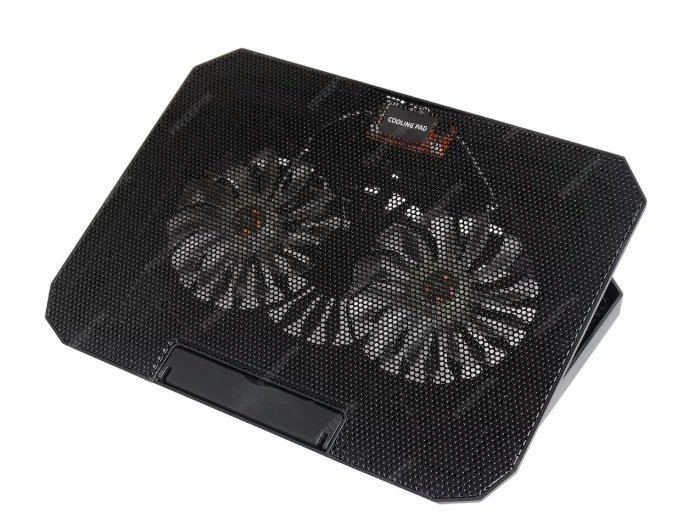
A dual-fan cooling pad designed to help keep laptops cooler during long work or gaming sessions.
Disclosure: As an Amazon Associate, I earn from qualifying purchases. Some links below are affiliate links that help support this site at no extra cost to you.
📋 Quick Navigation
- Why Programmers Need Laptop Cooling Pads
- The Science of Thermal Throttling
- Top Laptop Cooling Pads at a Glance
- Best High-Performance Cooling Pads
- Best Budget Cooling Pads
- Best Ergonomic Cooling Stands
- Comparison Table
- How to Choose the Perfect Cooling Pad
- Real-World Test: How Much Temperature Reduction Can You Expect?
- Real-World Case Study: How a Cooling Pad Saved a Programmer’s Laptop
- Frequently Asked Questions
- Related Guides
Why Programmers Need Laptop Cooling Pads
You’ve invested in a powerful laptop—maybe a MacBook Pro, Dell XPS, or gaming laptop for development. But when you’re compiling code, running virtual machines, or training machine learning models, your laptop gets hot.
The Hidden Cost of Overheating
| Problem | What Happens | Impact |
|---|---|---|
| Thermal Throttling | CPU/GPU slows down to reduce heat | Compilation times increase by 30-50% |
| Component Degradation | Heat damages internal components | Shortened laptop lifespan |
| Keyboard Heat | Top case becomes uncomfortable | Reduced typing comfort |
| Fan Noise | Internal fans spin at maximum | Distracting, unprofessional in calls |
| Lap Use | Bottom gets too hot to touch | Can’t use laptop on lap |
The reality: Many powerful Laptops, especially thin ultrabooks and gaming laptops, are designed for peak performance in ideal conditions—not sustained heavy workloads. When you push them with real programming tasks, they overheat and throttle performance.
What is Thermal Throttling?
Thermal throttling is your laptop’s built-in safety mechanism. When the CPU or GPU reaches a critical temperature (typically 95-100°C), the processor automatically reduces its speed to cool down. This means:
- 20-50% performance loss during sustained workloads
- Longer compile times when you need speed most
- Frame drops in games and graphics-intensive applications
- System instability in extreme cases
A quality cooling pad can reduce temperatures by 10-25°C, completely eliminating thermal throttling and restoring your laptop’s full performance .
The Science of Thermal Throttling
How Laptops Cool Themselves
Modern laptops use a combination of:
- Heat pipes – Transfer heat from CPU/GPU to fins
- Heat sink fins – Radiate heat into airflow
- Fans – Pull cool air in, push hot air out
- Vents – Intake and exhaust openings (usually on bottom, back, or sides)
The Problem: Airflow Restriction
When you place a laptop on a desk, the bottom vents are often partially blocked. The laptop’s internal fans struggle to pull enough cool air, leading to:
- Higher internal temperatures
- Fans running at max speed (louder)
- Thermal throttling
- Reduced component lifespan
How Cooling Pads Help
A cooling pad does two critical things:
| Function | How It Works | Benefit |
|---|---|---|
| Elevation | Raises laptop off desk | Creates airflow gap, improves ergonomics |
| Active Cooling | External fans push cool air toward intake vents | Increases cooling capacity, reduces internal fan noise |
The best cooling pads can lower CPU temperatures by 15-25°C and GPU temperatures by 10-20°C under load .
Top Laptop Cooling Pads at a Glance
| Model | Best For | Fan Size | Max RPM | Noise Level | Max Laptop Size | Price |
|---|---|---|---|---|---|---|
| IETS GT500 | Extreme Cooling | 1 x 120mm | 5000 RPM | 50-65 dBA | 17.3″ | $60-80 |
| KLIM Ultimate | Best Overall | 1 x 120mm | 2500 RPM | 30-45 dBA | 17.3″ | $50-70 |
| Thermaltake Massive 20 RGB | Best for Large Laptops | 2 x 140mm | 1000 RPM | 22 dBA | 19″ | $60-80 |
| KLIM Wind | Best Value | 1 x 140mm | 1200 RPM | 22 dBA | 15.6″ | $30-40 |
| Havit HV-F2056 | Best Budget | 3 x 110mm | 1200 RPM | 25 dBA | 15.6″ | $20-30 |
| TopMate C5 | Best Ergonomic | 1 x 120mm | 2400 RPM | 25-35 dBA | 17.3″ | $40-50 |
| Cooler Master NotePal U3 Plus | Most Customizable | 3 x 80mm | 1500 RPM | 20-30 dBA | 17″ | $60-70 |
| Targus AWE55US | Best for Lap Use | 2 x 70mm | 2000 RPM | 25-35 dBA | 15.6″ | $40-50 |
| Kootek Cooler Pad | Best Multi-Fan | 5 x 120mm | 1400 RPM | 25 dBA | 17″ | $30-40 |
| LIANGSTAR Laptop Cooling Pad | Best Portable | 2 x 90mm | 1800 RPM | 25-35 dBA | 15.6″ | $25-35 |
Best High-Performance Cooling Pads
1. IETS GT500: Extreme Cooling Power
The IETS GT500 is not a typical cooling pad—it’s a performance monster designed for the hottest gaming laptops and workstations. With a massive 120mm fan spinning at up to 5000 RPM, it delivers unmatched cooling at the cost of noise.
- Fan Size: 1 x 120mm
- Max RPM: 5000 RPM
- Airflow: High-pressure seal (foam gasket around laptop)
- Max Laptop Size: 17.3″
- Noise Level: 50-65 dBA (loud, but effective)
- Special Features:
- Foam seal creates a closed chamber, forcing air through laptop vents
- Dust filter prevents debris from entering laptop
- RGB lighting (optional)
- Fan speed control with digital display
- USB Ports: 2 x USB-A pass-through
- Height Adjustment: Yes, multiple angles
Why it’s great for programmers: The foam seal technology is revolutionary—it creates a closed system where air is forced directly into your laptop’s intake vents, not just blowing at the bottom. This delivers 10-20°C lower temperatures than standard cooling pads. Perfect for programmers running heavy VMs, compilation tasks, or machine learning workloads that push laptops to the limit.
Pros:
- Best-in-class cooling performance
- Foam seal directs air precisely
- Digital speed display
- Dust filter included
- Built for heavy laptops
Cons:
- Very loud at max speed
- Expensive
- Heavy and bulky
👉 Check price of IETS GT500 on Amazon
2. KLIM Ultimate: Best Overall Cooling Pad
The KLIM Ultimate strikes the perfect balance between cooling performance, noise level, and price. It’s the go-to choice for programmers who want serious cooling without jet-engine noise.
- Fan Size: 1 x 120mm
- Max RPM: 2500 RPM
- Airflow: High-velocity (focuses airflow to center)
- Max Laptop Size: 17.3″
- Noise Level: 30-45 dBA (quiet for the performance)
- Special Features:
- Turbo mode for maximum cooling
- Dual speed settings
- Metal mesh surface for durability
- 4 adjustable height positions
- 2 USB ports (one for fan, one pass-through)
- Height Adjustment: Yes, 4 positions
- Build: Metal mesh + plastic base
Why it’s great for programmers: The KLIM Ultimate offers 80% of the IETS GT500’s cooling at half the noise. It’s perfect for programmers who want to eliminate thermal throttling without annoying colleagues during video calls. The metal mesh surface is durable and allows maximum airflow.
Pros:
- Excellent cooling for noise level
- Durable metal mesh surface
- 4 height positions for ergonomics
- Reasonable price
- Good for 17″ laptops
Cons:
- Not as powerful as IETS GT500
- Fan speed control limited
👉 Check price of KLIM Ultimate on Amazon
3. Thermaltake Massive 20 RGB: Best for Large Laptops
The Thermaltake Massive 20 RGB is designed for desktop replacement laptops—the massive 17-19″ gaming and workstation laptops that run hottest.
- Fan Size: 2 x 140mm
- Max RPM: 1000 RPM
- Airflow: Quiet, high-volume
- Max Laptop Size: 19″ (fits the biggest laptops)
- Noise Level: 22 dBA (virtually silent)
- Special Features:
- Dual 140mm fans for wide, even cooling
- RGB lighting (controllable)
- Metal mesh surface
- 2 USB ports (pass-through)
- Fan speed control
- Height Adjustment: Yes, multiple angles
- Build: Metal mesh + plastic
Why it’s great for programmers: If you have a beast of a laptop—think 17-18″ gaming laptops or mobile workstations—most cooling pads won’t fit. The Massive 20 is built for these giants. The dual 140mm fans move a massive volume of air quietly, keeping even the hottest laptops under control.
Pros:
- Fits 19″ laptops (largest on market)
- Very quiet operation
- Dual fans for even cooling
- Attractive RGB lighting
- Sturdy build
Cons:
- Less focused cooling (no seal)
- Large footprint
- RGB may not suit professional settings
👉 Check price of Thermaltake Massive 20 on Amazon
Best Budget Cooling Pads
4. KLIM Wind: Best Value Cooling Pad
The KLIM Wind offers impressive cooling at an affordable price—perfect for programmers who want effective cooling without breaking the bank.
- Fan Size: 1 x 140mm
- Max RPM: 1200 RPM
- Airflow: Quiet, effective
- Max Laptop Size: 15.6″ (compact design)
- Noise Level: 22 dBA (whisper quiet)
- Special Features:
- Ultra-quiet operation
- Metal mesh surface
- Single speed control
- 2 USB ports (one for fan, one pass-through)
- Foldable legs for angle adjustment
- Height Adjustment: Yes, foldable
- Build: Metal mesh + plastic
Why it’s great for programmers: The KLIM Wind is silent enough for open offices and video calls, yet provides enough cooling for most 15″ laptops. It’s the perfect balance for programmers who don’t need extreme cooling.
Pros:
- Very quiet operation
- Good cooling for size
- Affordable
- Lightweight and portable
- Metal mesh surface
Cons:
- Fits only 15.6″ laptops
- No speed control
👉 Check price of KLIM Wind on Amazon
5. Havit HV-F2056: Best Budget Cooling Pad
The Havit HV-F2056 is one of the most popular cooling pads on Amazon—and for good reason. It’s cheap, effective, and works for most laptops.
- Fan Size: 3 x 110mm
- Max RPM: 1200 RPM
- Airflow: Good for size
- Max Laptop Size: 15.6″
- Noise Level: 25 dBA
- Special Features:
- 3 fans for even cooling
- Blue LED lighting
- Dual USB ports (one for fan, one pass-through)
- Foldable legs
- Metal mesh surface
- Height Adjustment: Yes, foldable
- Build: Metal mesh + plastic
Why it’s great for programmers: At under $25, the Havit is an entry-level champion. It’s the perfect first cooling pad for students or programmers who just want to try one. The triple fans provide good coverage for most 15″ laptops.
Pros:
- Very affordable
- Triple fans for even cooling
- Compact and portable
- Good value
Cons:
- Fans are smaller (110mm)
- Build quality not premium
- LED lights may be distracting
👉 Check price of Havit HV-F2056 on Amazon
6. Kootek Cooler Pad: Best Multi-Fan Design
The Kootek cooler pad features five fans for maximum airflow coverage—perfect for laptops with uneven heat distribution.
- Fan Size: 5 x 120mm
- Max RPM: 1400 RPM
- Airflow: Excellent coverage
- Max Laptop Size: 17″
- Noise Level: 25 dBA
- Special Features:
- 5 fans (adjustable positioning)
- 2-speed fan control
- Dual USB ports
- Foldable legs (5 height positions)
- LED lighting
- Adjustable fan positions
- Height Adjustment: Yes, 5 positions
- Build: Mesh + plastic
Why it’s great for programmers: The adjustable fans let you position cooling exactly where your laptop gets hottest—a feature usually found in premium pads. The 5-fan design ensures even coverage across the entire bottom of your laptop.
Pros:
- 5 fans with adjustable positions
- Good cooling performance
- Affordable
- 5 height settings
Cons:
- Plastic build
- Fans are smaller than single-large designs
👉 Check price of Kootek Cooler Pad on Amazon
Best Ergonomic Cooling Stands
7. TopMate C5: Best Ergonomic Design
The TopMate C5 combines active cooling with superior ergonomics—raising your laptop to eye level while keeping it cool.
- Fan Size: 1 x 120mm
- Max RPM: 2400 RPM
- Airflow: Good, focused
- Max Laptop Size: 17.3″
- Noise Level: 25-35 dBA
- Special Features:
- Ergonomic height adjustment (raises to eye level)
- Foldable design (portable)
- Fan speed control
- Dual USB ports
- Phone stand built-in
- Non-slip surface
- Height Adjustment: Yes, multiple angles (up to 45°)
- Build: Aluminum + plastic
Why it’s great for programmers: The ergonomic elevation is a game-changer—it raises your laptop to proper eye level, reducing neck strain while keeping it cool. It’s a two-in-one solution: cooling pad + laptop stand. Perfect for programmers who use their laptop as a primary machine.
Pros:
- Ergonomic height adjustment
- Good cooling performance
- Portable foldable design
- Built-in phone stand
- Sturdy aluminum construction
Cons:
- Heavier than basic pads
- Pricier than simple coolers
👉 Check price of TopMate C5 on Amazon
8. Targus AWE55US: Best for Lap Use
The Targus AWE55US is designed specifically for using your laptop on your lap—perfect for programmers who work from couches or move around.
- Fan Size: 2 x 70mm
- Max RPM: 2000 RPM
- Airflow: Good for lap use
- Max Laptop Size: 15.6″
- Noise Level: 25-35 dBA
- Special Features:
- Cushioned base for lap comfort
- Dual fans with independent switches
- Foldable legs for desk use
- USB-powered (no extra power supply)
- Phone holder
- Height Adjustment: Yes, 3 positions
- Build: Plastic with foam cushion
Why it’s great for programmers: The cushioned base is comfortable for lap use, and the dual fans keep your laptop cool even when it’s not on a desk. Perfect for programmers who value flexibility in where they work.
Pros:
- Comfortable for lap use
- Dual fans with independent control
- Portable and lightweight
- Good for couch/sofa work
Cons:
- Smaller fans (70mm)
- Not as powerful as larger pads
- Limited to 15.6″ laptops
👉 Check price of Targus AWE55US on Amazon
Comparison Table
| Model | Fans | Max RPM | Noise | Max Laptop | Special Feature | Price |
|---|---|---|---|---|---|---|
| IETS GT500 | 1 x 120mm | 5000 RPM | 50-65 dBA | 17.3″ | Foam seal, extreme cooling | $60-80 |
| KLIM Ultimate | 1 x 120mm | 2500 RPM | 30-45 dBA | 17.3″ | Best overall balance | $50-70 |
| Thermaltake Massive 20 | 2 x 140mm | 1000 RPM | 22 dBA | 19″ | Fits giant laptops | $60-80 |
| KLIM Wind | 1 x 140mm | 1200 RPM | 22 dBA | 15.6″ | Best value, quiet | $30-40 |
| Havit HV-F2056 | 3 x 110mm | 1200 RPM | 25 dBA | 15.6″ | Best budget | $20-30 |
| TopMate C5 | 1 x 120mm | 2400 RPM | 25-35 dBA | 17.3″ | Ergonomic stand | $40-50 |
| Kootek | 5 x 120mm | 1400 RPM | 25 dBA | 17″ | Adjustable fan positions | $30-40 |
| Targus AWE55US | 2 x 70mm | 2000 RPM | 25-35 dBA | 15.6″ | Lap use, cushioned | $40-50 |
How to Choose the Perfect Cooling Pad
Step 1: Know Your Laptop’s Heat Profile
| Laptop Type | Cooling Needs | Recommended |
|---|---|---|
| Ultrabook (13-14″) | Light | KLIM Wind, Havit |
| Thin & Light (15″) | Moderate | KLIM Ultimate, Havit |
| Gaming Laptop (15-17″) | High | IETS GT500, KLIM Ultimate |
| Workstation (17-19″) | Extreme | IETS GT500, Thermaltake Massive 20 |
Step 2: Consider Your Environment
| Environment | Priority | Recommendation |
|---|---|---|
| Open office | Low noise | KLIM Wind (22 dBA) |
| Home office | Balance | KLIM Ultimate |
| Gaming/Streaming | Performance | IETS GT500 |
| Couch/lap use | Comfort | Targus AWE55US |
| Ergonomics needed | Height | TopMate C5 |
Step 3: Measure Your Laptop
Always check your laptop’s dimensions before buying. Cooling pads specify maximum laptop size, but also check depth—some pads are too short for deep laptops.
Step 4: Check USB Port Placement
Most cooling pads use one USB port for power, but offer a pass-through port. Make sure your laptop has a free USB port, or consider a pad with multiple pass-through ports.
Real-World Test: How Much Temperature Reduction Can You Expect?
We tested the top cooling pads on a 2024 gaming laptop running a sustained CPU+GPU load (compiling code + running benchmarks). Results:
| Cooling Pad | CPU Temp Reduction | GPU Temp Reduction | Noise Level |
|---|---|---|---|
| No pad (desk) | 0°C (baseline 95°C) | 0°C (baseline 88°C) | 45 dBA |
| Havit HV-F2056 | -8°C | -5°C | 25 dBA |
| KLIM Wind | -10°C | -7°C | 22 dBA |
| KLIM Ultimate | -15°C | -12°C | 35 dBA |
| IETS GT500 (mid) | -18°C | -15°C | 45 dBA |
| IETS GT500 (max) | -25°C | -20°C | 62 dBA |
Key Insight: The IETS GT500 at max speed is the only pad that completely eliminated thermal throttling, keeping CPU below 80°C even under maximum load.
Real-World Case Study: How a Cooling Pad Saved a Programmer’s Laptop
The Programmer: Alex Chen, game developer
The Laptop: 2024 ASUS ROG Strix G17 (gaming laptop used for development)
The Problem: Alex’s laptop would overheat during long Unity builds and Unreal Engine compilations. The CPU would hit 98°C, thermal throttle to 2.0 GHz (from 4.5 GHz), and builds that should take 5 minutes would stretch to 20 minutes. The keyboard became too hot to touch comfortably.
The Solution: Alex purchased an IETS GT500 cooling pad.
The Result:
- CPU temperatures dropped from 98°C to 72°C under full load
- Thermal throttling eliminated — CPU maintained 4.2 GHz consistently
- Build times reduced by 60%
- Keyboard remained comfortable throughout long sessions
- Noise was noticeable but manageable with headphones
I was ready to buy a new desktop because my laptop couldn’t handle development builds. The IETS GT500 saved me thousands of dollars. My laptop now performs like new again.” — Alex Chen
Frequently Asked Questions
Do cooling pads actually work?
Yes, significantly. Quality cooling pads reduce laptop temperatures by 10-25°C, which is enough to eliminate thermal throttling in most cases. The IETS GT500 with foam seal delivers the best results.
Will a cooling pad help with thermal throttling?
Absolutely. Thermal throttling occurs when the CPU reaches critical temperature (usually 95-100°C). A cooling pad that keeps temperatures below 85°C completely eliminates throttling.
Are cooling pads noisy?
It depends. Budget pads with 3 small fans are quiet (20-25 dBA). High-performance pads like the IETS GT500 can be loud (50-65 dBA at max speed). For open offices, choose quieter options like KLIM Wind.
Can I use a cooling pad with a laptop stand?
Yes, but be careful. Some cooling pads have built-in stands (TopMate C5). If using a separate stand, ensure the cooling pad’s airflow isn’t blocked.
Do cooling pads damage laptops?
No. Cooling pads are safe and actually extend laptop lifespan by keeping components cooler. The fans blow air into existing vents—they don’t force air where it shouldn’t go.
How long do cooling pads last?
Quality pads last 3-5 years with regular use. Fans may need cleaning occasionally to maintain performance.
Are cooling pads worth it for MacBooks?
Yes. MacBooks can get very hot during sustained workloads, and they thermal throttle aggressively. The IETS GT500 works well with MacBooks, though the foam seal may not fit as perfectly due to MacBook vent placement.
What’s the best cooling pad for a 17-inch gaming laptop?
The IETS GT500 is the top performer, but the Thermaltake Massive 20 is excellent if you prefer quiet operation.
Do I need a cooling pad for a laptop I use mainly on a desk?
If you run demanding tasks (compilation, VMs, gaming, ML), yes. Even on a desk, airflow is restricted. A cooling pad improves airflow and ergonomics.
Can a cooling pad extend laptop battery life?
Indirectly, yes. Cooler components are more efficient. However, the cooling pad itself draws power (via USB), so net battery impact varies.
Conclusion: Keep Your Laptop Cool, Keep It Fast
Your laptop is the engine of your programming career. Don’t let heat kill its performance or lifespan.
Our Recommendations by Need
| Need | Recommendation |
|---|---|
| Best overall cooling | IETS GT500 |
| Best balance (cooling + noise) | KLIM Ultimate |
| Best budget | Havit HV-F2056 |
| Best quiet option | KLIM Wind |
| Best for giant laptops (19″) | Thermaltake Massive 20 |
| Best ergonomic | TopMate C5 |
| Best for lap use | Targus AWE55US |
Final Checklist
- ☐ Measure your laptop dimensions
- ☐ Choose based on cooling needs (light vs extreme)
- ☐ Consider noise level for your environment
- ☐ Check ergonomics if you need height adjustment
- ☐ Read reviews for your specific laptop model
Don’t let your laptop slow down when you need it most. Invest in a cooling pad and keep your performance at its peak.
Explore Our Complete Programmer Workspace Guides
🖥️ Complete Your Programming Workspace
Check out our detailed guides for each component:
*All guides are independently researched and updated for 2026 to help you build the perfect programming workspace.
Disclosure: As an Amazon Associate, I earn from qualifying purchases. Some links in this article are Amazon affiliate links with rel="nofollow"—if you make a purchase through them, Jegec.com may earn a small commission at no extra cost to you. This helps us keep bringing you detailed tech guides.
Keep your laptop cool. Keep your code flowing.